
In the first three articles of this series, we:
- Selected a brick-walled ancestor we’d like to find
- Learned how to overcome the hurdle of DNA matches without trees
- Discussed methods to locate our ancestors’ mitochondrial DNA (mtDNA) and Y-DNA
I suggest reading these articles in order.
- FOCUS: A New Series Focused on Breaking Down Brick Walls
- FOCUS: Step 1 – Seven Solutions for DNA Matches with Absent or Shrunken Trees
- FOCUS: Step 2 – Finding the Y-DNA and Mitochondrial DNA of Your Ancestors
In this article, we’re going to learn how to use mitochondrial DNA or Y-DNA to help identify the ancestor you’re seeking.
Multiple Levels of Information
Mitochondrial DNA and Y-DNA testers receive important information that includes matching with other testers, several interpretive tools and reports, and a haplogroup which is the key to unlocking the past.
Since people have tested at varying levels, or maybe they’ve simply obtained a partial haplogroup from autosomal testing, you may encounter varying levels of information about the same ancestor.
As we noted in Finding the Y-DNA and Mitochondrial DNA of Your Ancestors, you could be working with:
- The most refined haplogroup possible if you or the tester has tested at either the mtFull or the Big Y-700 test level at FamilyTreeDNA.
- A full haplogroup, whether you have access through the tester’s account, which provides additional tools, such as matches, or access to the haplogroup only, meaning not directly through the tester’s account.
- A partial haplogroup if the tester has tested at a lower level, or the haplogroup was determined through an autosomal DNA test. Autosomal tests only provide partial haplogroups.
- Minimum information, meaning an unknown haplogroup level without access to the tester’s account information.
All of these can be useful, but for our example, we’re assuming account-level access along with the highest testing level, which provides the most refined haplogroup possible.
Also note that both Y-DNA at the Big Y-700 level and mitochondrial DNA haplogroups at the mtFull level are evergreen. This means that when more people’s test results produce additional mutations that you share, and that qualify for a new haplogroup, you’ll automatically receive that new haplogroup.
New Y-DNA haplogroups are typically added within a few days or a couple of weeks after the new tester’s results are complete. For mitochondrial DNA, an updated Mitotree is calculated every few weeks, and your haplogroup may be refined from time to time.
Matches are the Backbone of DNA Testing
As with all types of DNA testing, matches are critically important.
With Y-DNA matching, the tester typically has the benefit of a recognizable, or at least similar, surname on their match list. However, that’s not always the case.
I’m starting with the results of one of my Estes cousins who has taken the Big Y-700 test as an example because it affords me the opportunity to review all of the genealogical benefits of the highest testing level.
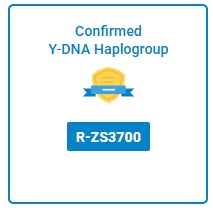
My cousin’s Big Y-700 haplogroup is R-ZS3700, which was formed about 1750 CE. Note that all haplogroup origin dates are actually a range.
Using the results of Big Y-700 testers combined with genealogy, we know exactly which of the Estes males developed that mutation.
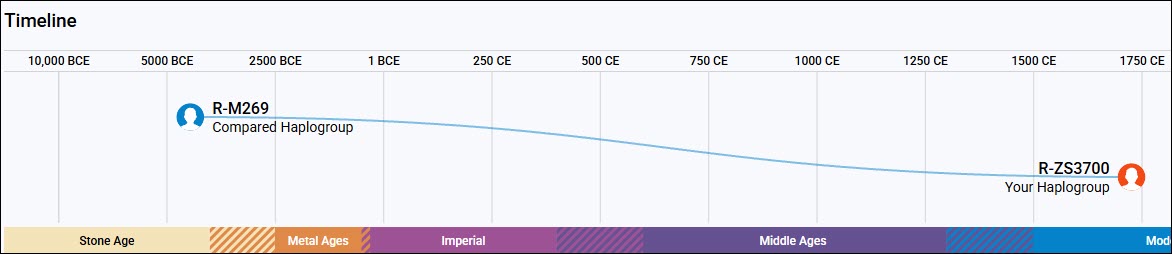
Prior to taking the Big Y-700 test, my cousin’s predicted haplogroup based on STR testing was R-M269, a difference of about 6,200 years.
If you’re a new tester, a haplogroup from 6,450 years ago versus one that places you directly as a descendant of Moses Estes, born in 1711 in King and Queen County, Virginia, is night and day.
Y-DNA Testing and Matching Levels
All Y-DNA testers receive the regular STR (Short Tandem Repeat) panel matches at the level they’ve purchased – ranging from 12-111 markers, including all markers beneath that level.
Testers at the now obsolete Big Y-500 and current Big Y-700 level also receive 500 and 700 STR markers, but the SNPs (Single Nucleotide Polymorphisms) revealed at this level of testing greatly overshadow the usefulness of those additional STR markers.

Men who take the Big Y-700 test receive Big Y-700 SNP matching separately from STR panel matching on their dashboard.
12-111 STR Panel Matches
Clicking on “Y-DNA Matches” under “Y-DNA Results and Tools” shows the tester’s STR panel matches at various levels. Big Y testers should not ignore these because not all people have tested at the Big Y-700 level.

Click any image to enlarge
At the top of the matching display, note that the STR match levels are shown. Matching defaults to the testing level of the tester. In this case, my cousin took the Big Y-700 test, so the matches he’ll see first are his 40 111-marker matches.
Not everyone has tested at that level.
The very first Y-DNA test offered in this industry 26 years ago was at FamilyTreeDNA and was only 12 markers. It was revolutionary at the time, affording genealogists the ability to determine if two men with the same surname were descended from the same paternal line. This also means that FamilyTreeDNA has men in their database that testers can match today who tested a generation ago, many of whom have since passed away.
Over the years, the tests have expanded and improved. Today, men can purchase the introductory 37-marker test, which includes the 12- and 25-marker levels, or the 111-marker test, which includes all the lower levels. Big Y-700 testers receive everything, plus a substantial amount of additional information not available with the STR tests.
Notice that our Estes tester has 40 111-marker matches, but 238 12-marker matches. This is due, in part, to the fact that many men have not upgraded to the higher-level tests. Some men will match on the 12-marker test but will have too many mismatches at higher-level testing. Generally, when both men are being compared at the same level, the higher-level tests ferret out matches that occur simply because they share a very old and distant haplogroup.
The “Genetic Distance” step number is NOT the number of generations difference, but the number of mutational steps separating the results at the level being viewed.
H Estes, the first match, tested at the 111-marker level, so 1-111 markers are being compared. My cousin and H Estes have a “1-step” difference at 111 markers. That means H Estes matches my cousin on 110 of the 111 markers in that panel.
The values of those markers can be viewed under the “Y-STR Results” under the “See More” tab, but the values themselves are not generally informative. You cannot see your matches’ values unless they have joined a group project. Some group projects are displayed publicly, and some are not.

If a tester has joined a DNA Group Project, such as the Estes Project, the values for consenting participants can be seen there, along with additional information such as the Earliest Known Ancestor (EKA).
In general, the fewer the mismatches, the closer the relationship. That said, STR (Short Tandem Repeat) markers are inherently unstable. Mutations and back-mutations can happen at any time, which sometimes makes the results misleading. Haplogroup-defining SNP mutations don’t suffer from that issue.
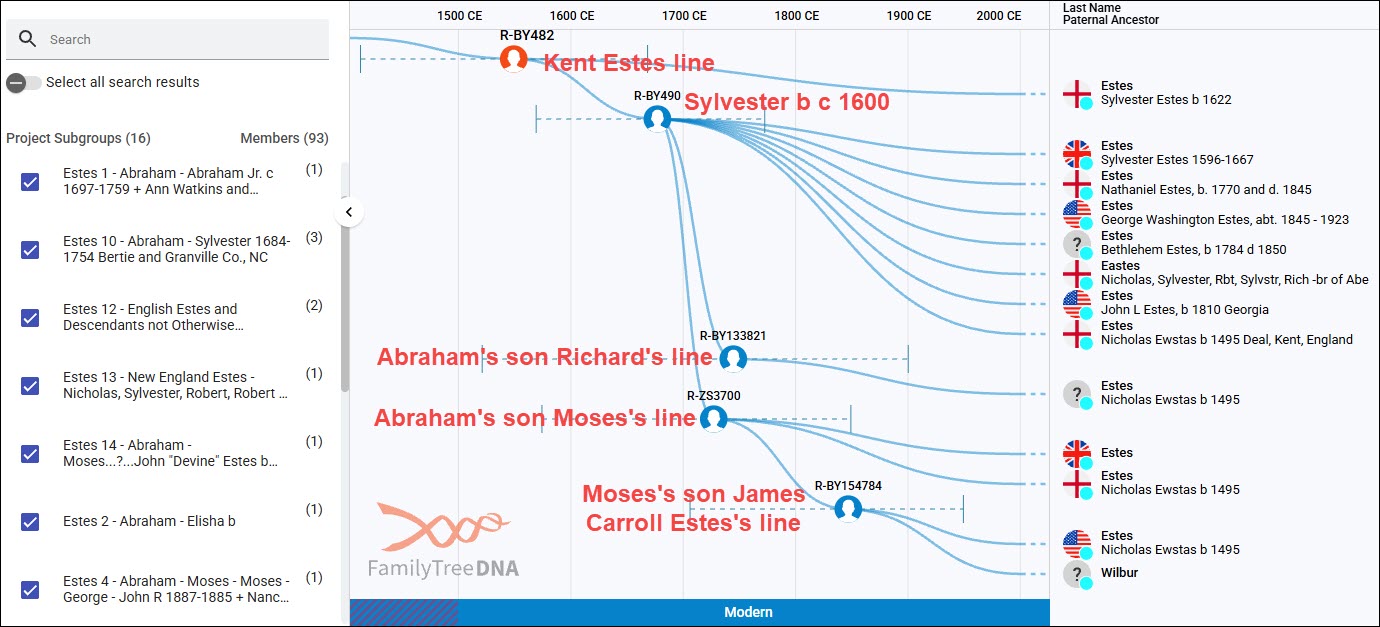
You can also see project members listed in Group Time Tree format as we discussed in the third FOCUS article, here.
More Hints on the Matches Page
Additional important genealogy hints on the Matches page include the “Paternal Country of Origin” and, of course, the “Earliest Known Ancestor.”
Always check the trees of your matches, even if the match has a different surname. Adoptions, both formal and informal, have been going on as long as there have been humans, and family trees can also hold location proximity information. Think, “right time, right place.”
In the second article, FOCUS: Step 1 – Seven Solutions for DNA Matches with Absent or Shrunken Trees, we discussed how to work around small or absent trees.
Be sure to inspect every match level. Some people view their 111-marker matches but ignore their 12-marker or other match levels.
In this case, there are 198 more 12-marker matches than 111-marker matches, so don’t neglect to review each one. Think of it this way – there are 198 hints you’re missing if you don’t.
Depending on where mutations randomly happened to occur, you may NOT match someone at the 12-marker level that you DO match at higher levels, so you can’t always assume that all of your 25-marker matches are shown at the 12-marker level or vice versa.
In the Estes lineage, we’ve been recruiting males and solving mysteries for 25 years now, but not every lineage has this many testers with surname matches. Then, of course, there’s mitochondrial DNA, where surnames won’t meaningfully match testers.
Mitochondrial DNA Matching
People working with mitochondrial DNA consider Y-DNA testers fortunate because their surname tends to remain the same across generations, at least in some parts of the world.

For the most part, mitochondrial DNA matching is the same as Y-DNA matches, except:
- You seldom recognize a surname
- If you do recognize a surname, it won’t be the tester’s surname that matches yours, but perhaps you’ll recognize the surname of their Earliest Known Ancestor
- You have a Mitotree Haplogroup in addition to the mtDNA Haplogroup
- You have an F number, which is your haplotype cluster number, in addition to your Mitotree Haplogroup
All people who take or upgrade to the mtFull level test will receive a new Mitotree haplogroup in addition to the older legacy haplogroup. Mitotree was released in 2025 and restructured the entire mitochondrial DNA tree of humankind.
People who only took the HVR1 (Hypervariable Region 1) or HVR1+HVR2 Plus level tests can’t receive the new haplogroup because not enough locations have been tested, so you’ll only see their legacy haplogroup when you’re viewing your lower-level matches. Don’t neglect your HVR1 and HVR2 matches, because the very hint you need may be waiting there.
Your Coding Region matches include the entire mitochondrial sequence – in other words – the mtFull test.
About Haplotype Clusters
As part of your Mitotree haplogroup, you also have a haplotype cluster number which begins with F. The number itself doesn’t matter. The message does.

The mitochondrial DNA matching system excludes several unstable markers because they may provide essentially false matches. However, they can sometimes be useful genealogically, so we have multiple matching criteria.
- Rose’s example: The genetic distance matching excludes unstable markers such as 315.1, so it’s possible to have an “Exact Match” under Genetic Distance, but a different F number because not every location matches.
- Anastasia’s example: It’s NOT possible to have a “1 step” Genetic Distance, but the same haplotype cluster F number. It is possible to have the same haplogroup.
- Per’s example: An identical F number, or haplotype cluster, means you match exactly, INCLUDING any excluded or unstable markers, such as 315.1.
In other words, proceed with caution, and your mileage may vary.
Check marks in the blue boxes mean you have the same haplogroup and/or the same haplotype cluster as your match.
I wrote about haplotype clusters here and here.
Identifying Sophia
In this example, Ms. Traxler and Mr. Lyman are exact matches in the regular “Genetic Distance” matching, their haplogroup, and the new Mitotree haplotype clusters.
In the third example, Ms. Crosbie has a 1-step difference, which means, in this case, she is missing a haplogroup-defining mutation. We know this because her haplogroup is V216a instead of V216a2. And of course, she doesn’t match our tester exactly, so they don’t share an F number either.
The tester, a family member, was brick-walled at his great-grandmother, Sophia Smith, born in 1877, someplace, and died in 1950 in Richland County, Ohio. It seemed like she was dropped off by the stork in the middle of a field, because records about her didn’t seem to exist.
Even though the surnames are different, and Traxler doesn’t have a tree, the name Schmidt in the EKA field caught my eye. Smith is Schmidt in German, and I knew the tester had German heritage in other lines, but Sophia Smith was supposed to be English.
Sophia Smith was married to John Rittinger. That, plus their children’s names, was all I had, but it was eventually enough.
I clicked on the match’s EKA link, and it showed that Elizabeth Schmidt Hornung was born in 1888 and died in 1930.
At this point, I’m wondering whether Schmidt was a middle name or a birth surname.
Two days and a sleepless night later, I had discovered that Hornung was her married name, and Elizabeth Schmidt had married Karl Hornung. As these things tend to do, one thing led to another, and eventually, sorting through newspaper articles, death certificates, and a bunch of misinformation, misspelled names, dead ends, and wrong turns, I found information linking Elizabeth to her brother, Joseph, who connected to their sister, Sophia Schmidt. But was Sophia Schmidt the same person as Sophia Smith?
Finally, running on pure caffeine and determination, I found Elizabeth Hornung’s death announcement in the newspaper, where it gave the names of her siblings, including Mrs. John Rittinger. Now I needed to connect a few final dots to verify that her sister was, in fact, that same Mrs. John Rittinger (by several spellings).
I eventually connected even more dots and discovered the family was from Timisoara, Romania, even though the area where they lived changed borders more than once and fell within the multiple countries of the Austro-Hungarian Empire.
Then, I discovered their parents’ names, but the parents never immigrated, and we don’t know any more about them. Unfortunately, that area was terribly ravaged by WWII, which is what spurred immigration.
The point being that it’s incredibly important to follow every available clue, even if it seems rather pointless. You never know which tidbit is the right one, and if you skip them, you’ll never make that breakthrough.
Follow your exact haplotype cluster matches first, then your exact and one-step regular matches, then your haplogroup-only matches, and then your near-haplogroup matches.
What if the Y-DNA Match Surnames Aren’t the Same as Yours?
Let’s say you take a Y-DNA test and your surname is Estes. Furthermore, your father and grandfather carry the same surname.

So, you didn’t expect to see this on your match page.
First, breathe.
Second, you’re looking at 12-marker matches. It’s not at all uncommon for men within a core haplogroup, like R, to match at the 12-marker level even though they may not have shared a common paternal ancestor in thousands of years.
Panning for Gold
But wait, you’re saying, you just told me not to ignore 12-marker matches.
At 12 markers, you’ll need to focus on your own or similar surnames. It’s like panning for gold.
At 12 markers, my Estes cousin has a total of:
- 35 Estes matches
- 2 Easter matches
- 1 Eastes match
- 3 Eastridge matches
This means that he also has 197 non-similar surname matches.
The information you need may well be buried in the information provided by those 12-marker Estes or similar surname matches.
For example, if your surname is Eastridge or Easter, you might want to look at historical documents to compare your ancestors’ surnames. We now know that Easter happened sometime near the Civil War in North Carolina, probably because the final S in Estes was interpreted as an R. The circumstances surrounding Eastridge are less clear, but we know roughly when and where it occurred in North Carolina.
A group of researchers spent years trying to unravel the Eastridge mystery and have narrowed the event to a specific North Carolina county.
On the other hand, if an Easter or Eastridge male takes the Big Y-700 test, he will know immediately if he falls into this Estes grouping, and where, or if he belongs to a different genetic lineage.
A Genetic Detour
However, if your surname is Jones and you match a large number of Estes males at the highest testing levels, and you don’t match any or many other men by your surname, that might be a significant hint about your brick-walled ancestor.
The telltale sign may be that you can track your surname and DNA matching back a couple of generations, then nothing. I recommend working progressively upstream, testing male-line descendants of different sons in each generation, if possible.
In this example, John Jones is the progenitor of the Jones family. According to the genealogy, he had three sons, Elijah, Sidney and William.

In this hypothetical situation, Rodney Jones’ descendant tested and discovered that he matched a whole group of Estes men, many with his own haplogroup – R-ZS3700. A descendant of Nathaniel Jones, a second son of William Jones, tested and confirmed that he matches the descendant of Rodney.
So far, so good.
Next, a direct male-line descendant of Sidney Jones tested and sure enough, he’s a member of haplogroup J. Hmmm. We need another Jones male that descends from another son of John as a tiebreaker. Lucky for our tester, further investigation revealed that Sidney’s descendant matches a descendant of Elijah Jones, another son of John.
This tells us exactly where the genetic break in the Jones line occurred. Between John and William Jones. You may have heard this situation referred to as a “misattributed paternity,” or an NPE, “not parent expected,” but we really know what happened, or why, without additional research.
Caution – Don’t Jump!
A word of caution here. Never, ever jump to conclusions about “cheating wives.” While that’s one possibility, there are several other circumstances we need to consider and rule out first.
In many cases, a young widow remarried, and her baby took the stepfather’s surname. The “adoption” wasn’t remarkable. Adoptions in 1600s, 1700s, 1800s and into the 1900s were informal, not legal affairs. Everyone at the time knew about it, but over the generations it was forgotten until DNA testing shocked everyone.
In another case, a widow had two children more than 9 months after her husband died and both children took the deceased husband’s surname, which was then their mother’s surname.
When making these discoveries, we also need to keep in mind that not all sexual encounters were consensual.
Sometimes, the situation is complicated. I know of a case during the Civil War where a woman traded favors with a soldier of the opposing army for food for her children. Her husband returned home to a pregnant wife, but his wife and children had all lived, and he simply raised that child as his own. That family’s oral history was confirmed by DNA testing.
Now, in our example, given that our Jones tester carries haplogroup R-ZS3700, we know that he descends from Moses Estes, born in 1711, the progenitor of that haplogroup. We need to begin by working down the genealogical tree with Moses and look for an Estes male in the same location as William Jones’ mother about 10 months before his birth. Also consider factors like warfare and trader movement. Check the census for missing children, or a child that suddenly appears in a later census that should have been recorded with the family in an earlier census. Notice anomalies.
Look for the surname you match the most closely in that location and at that time. Right time, right place, and opportunity.
And of course, to complicate things further, don’t assume that the mother was the mother either. Sometimes both parents died and someone took the child to raise as their own. Review all of the evidence at hand with fresh eyes.
Matches Map
Another matching feature for both Y-DNA and mtDNA includes the Matches Map.

For Y-DNA, the Matches Map can be found under the “See More” tab.
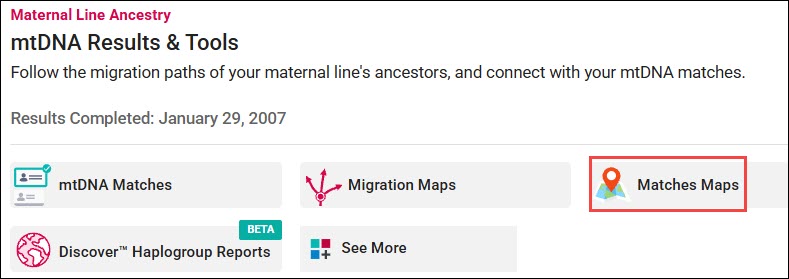
For mitochondrial DNA, it’s found under “mtDNA Results and Tools.”
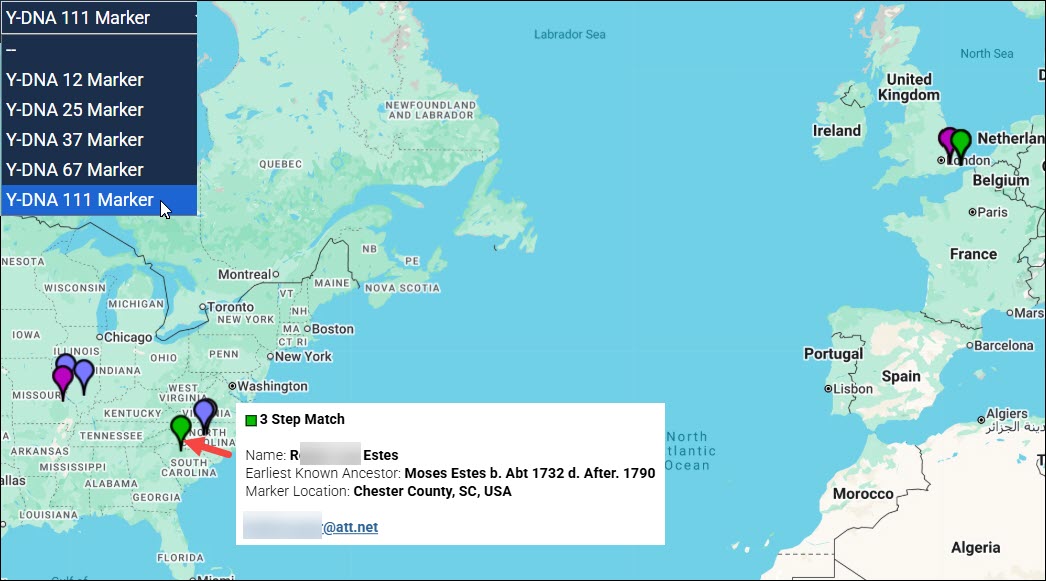
While the Matches page and Discover reports both provide the Country of Origin, the Matches Map provides a specific location where your match’s earliest known ancestor is found. Be sure to select the match level using the drop-down in the upper left-hand corner, or no results will display, and you’ll receive the message that there are no results available.
The Matches Map is extremely useful for quickly identifying common locations, especially when surnames don’t match.
The Matches Map utilizes the location entered for your EKA.
Add Your Earliest Known Ancestor and Locations
Please be sure to add your Earliest Known Ancestor and their location under the drop-down beside your name at the upper right-hand corner of your dashboard page. Click on the gear for “Account Settings,” then “Genealogy.”

You don’t need to know the longitude and latitude. Just click on “Update Location,” which takes you to the map where you can simply search for and select the location, which updates these fields.
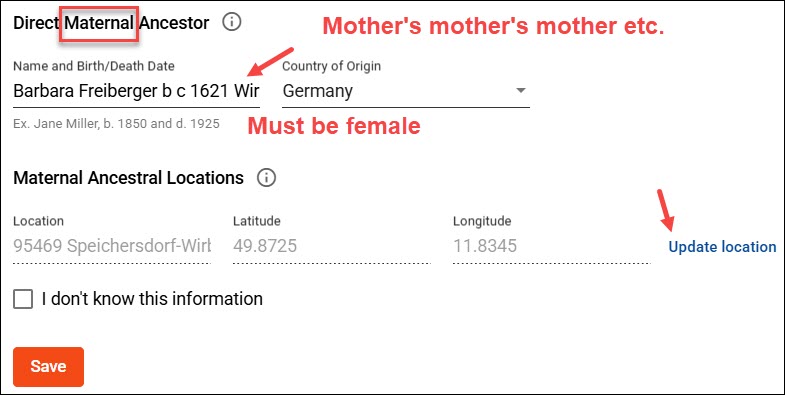
An identical field for your matrilineal line is found below the paternal section. For purposes of clarification, this is NOT any woman on your “maternal” line, and NOT the “earliest known person” on your maternal side. The ancestor must be a female, and it is ONLY ever your mother’s mother’s mother’s direct matrilineal line – through all women – to the end of that line.
If you see a male EKA in your mitochondrial DNA match list, you know the tester was confused about what to enter here. Hopefully they have a tree that you can view to find the correct EKA.
In addition to your EKA, please add the list of your family surnames, your Family Tree, and a link to your profile at WikiTree while you’re there. You’ll see in just a minute why that information is so important and how it benefits your genealogy.
The Difficult Moore Line
Let’s look at a much more difficult scenario.
My James Moore line (c1720-c1798) is my decades-long brick wall. He first appears in Amelia County, VA, and then moved to Halifax County. His wife was Mary Rice. His life before that is a blank slate, despite my earlier efforts and those of several cousins. I wrote about him here and here.
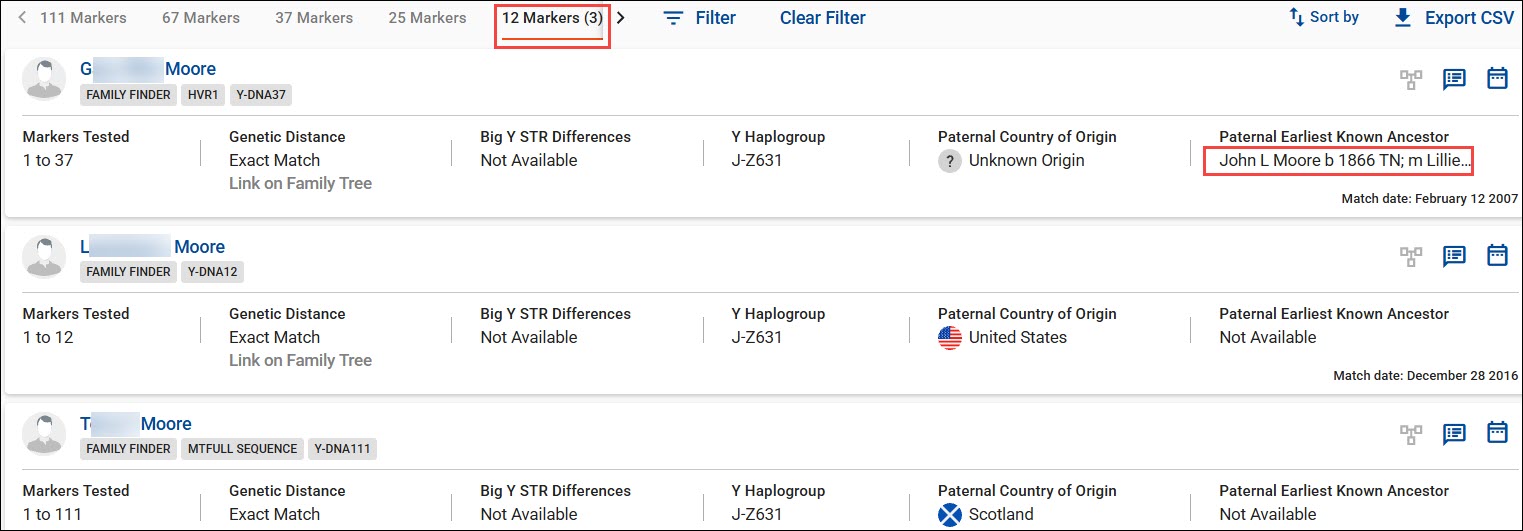
My Moore cousin, who is deceased, so cannot upgrade his Y-DNA test from its original 12 markers, has only three matches at the 12-marker level. This is all I have to work with except for his autosomal Family Finder results.
Note that one of his matches tested at the 12-marker level, one at 37 markers, and one at 111 markers. Each man would have received a predicted haplogroup based on his STR marker test. Recently, if they had taken a Family Finder test, their predicted haplogroup would have been updated and overwritten by a confirmed haplogroup derived from Family Finder.
Not only are Family Finder haplogroups more specific and closer in time than predicted haplogroups from STR tests, but they are also SNP-confirmed, not predicted.
Keep in mind that not all autosomal DNA chips were programmed to read the same Y-DNA and mtDNA locations. At that time, they were never intended to be used for this purpose, which probably explains the two different haplogroups for the Moore men.
My Moore cousin’s original predicted haplogroup based on his STR test was J-M102. His Family Finder results updated his haplogroup to J-M241, while his matches are J-Z631.
Using Discover’s Compare feature, we find that:
- J-M102 developed about 16,000 years ago
- J-M241 developed about 9,500 years ago
- J-Z631 developed about 2,950 years ago
While their haplogroups don’t match because they come from different sources, they are still in the same genetic lineage on the Y-DNA phylogenetic tree. In other words, they don’t preclude a common ancestor. Since they also match on their STR markers and share the same surname, we don’t need to be terribly concerned about false Y-DNA matches.
I’ve tried to break through this brick wall many times, but let’s try again using new information.
To begin with, there are many more genealogy resources available now than when my cousin and these other men tested. I had originally communicated with all three of his matches when they initially matched, and they provided me with what little they knew.
I still have that information entered into a tiny tree on my computer. I have not been able to get ahold of these men now in several years, so I’m VERY glad that I reached out when I did. Reach out and collaborate now. You never know when it’s too late.
Y-DNA Plus Family Finder Yields More Hints
Let’s move to my Moore cousin’s autosomal Family Finder matches and see if there’s any additional help buried there.

Searching his Family Finder match list for “Moore” produces 39 people with the Moore surname, and 256 people with the Moore surname either in their own name or their surname list. This is why entering your list of ancestral surnames is important.
I selected the 39 Moore surname matches, then focused on the males’ Y-DNA haplogroups. Our Moore cousin’s haplogroup is J-M241, and his Y-DNA matches’ haplogroups are all J-Z631.
Haplogroups derived from autosomal testing are very useful when viewing autosomal matches with Moore men. As you can see, these Moore men aren’t in the same major haplogroup as our line, so even though they share the same surname, it’s happenstance. Their haplogroup results preclude matches due to their Moore direct paternal line.
Autosomal transfer haplogroups do not update Y-DNA haplogroups and are not displayed to autosomal matches due to quality and consistency challenges.
Working with the rest of my Moore cousin’s autosomal matches, I did not find others who match with haplogroup J and the Moore surname.
If I had found another Moore male that fell someplace in the same branch of haplogroup J, I could use autosomal tools to view shared “in common” matches and triangulate segments to identify others who share that specific lineage. Autosomal matches’ trees plus the genealogy work I’m doing on the trees of the Y-DNA testers might lead to a breakthrough on the Moore line that is severely brick-walled in colonial Virginia.
This approach didn’t work this time, but new matches appear all the time, and autosomal matches may help.
However, we’re not done.
Advanced Matching
FamilyTreeDNA provides an Advanced Matches feature that allows you to select matching criteria across different tests to see whether anyone matches you on those combined criteria.
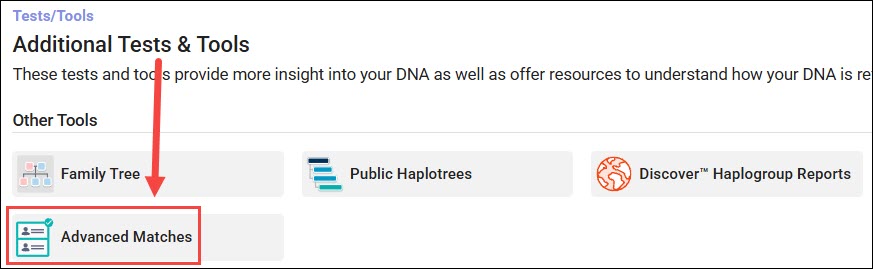
You’ll find “Advanced Matches” in the “Additional Tests and Tools” section.
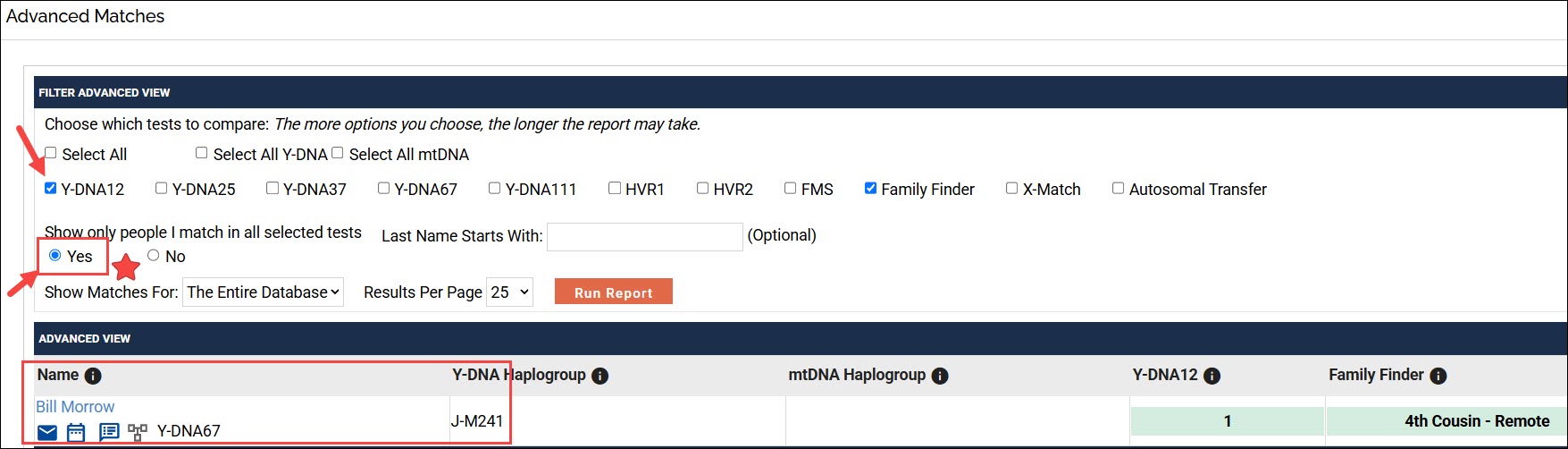
You can select the tests to compare to see if people match you on ALL of the criteria you choose.
Yes, ALL is bold red because if you select any of the “Select All” features – that means everything. So, if you select “All Y-DNA” you must match at the 12, 25, 37, 67 and 111 marker levels – not just one of them. If someone doesn’t meet the matching criteria at any individual selected level, that person won’t show on the combined match list.
So, select one Y-DNA choice that both people have, plus Family Finder.
Then, CHECK “YES” under “Show only people I match in all selected tests.” Otherwise, you’ll see everyone you match on both tests, combined.
In this example, one of my cousins matches a Morrow male on both the 12-marker test and the Family Finder test. If I had NOT checked “yes,” I would have seen all of my cousin’s Y-DNA AND all of his Family Finder matches on this list.
Is Morrow the same paternal lineage as Moore? We don’t know. Matching on both tests DOES NOT mean your match is from the same line.
However, this possibility absolutely warrants additional investigation.
Big Y Matching

Big Y matches and tools are displayed separately from STR matches.

The only reason I look at the matches page is to see who has a tree, because the most useful information is provided on the Block Tree and in Discover.
Big Y Block Tree
The Block Tree is an alternate way to view tree relationships over time.

The block tree shows a top-down genetic view of the original Estes line out of Kent. The primary named haplogroup is R-BY482, shown at the top of the blue block labeled “Estes in Kent.” The haplogroup names, like BY483 shown in that same block, mean that all of the men within and beneath that block also have those SNP mutations. Someday, a man may come along and test who does NOT have all of those mutations, or has additional mutations, and may be a candidate to form a new haplogroup.
For genealogy, the point is to see who you’re genetically the closest to.
In this case, our Estes tester falls into the Moses descendant group with haplogroup R-ZS3700. Because other men have already tested and we’ve done that associated genealogy work, we know that this mutation occurred with the birth of Moses Estes, who was born in Virginia in 1711.
Another branch, the James Carroll Estes line, has been defined beneath Moses’ line. If you were to take a DNA test and find yourself in haplogroup R-BY154784, you would know that your ancestor was born to a son of James Carroll Estes who was born in 1860 – so not many generations back in time. You’ll notice a man with the surname of Wilbur in this branch. Sometime, and in some set of circumstances between about 1880 and the present generation, the surname became Wilbur, but the genetic line is absolutely Estes. I view this as the Wilburs having established a new genetic branch in their family line while also being Estes cousins.
Discover
For both Y-DNA and mitochondrial DNA, Discover holds a plethora of wonderful information. Lower-level haplogroups can use the free versions of Discover, but we’re going to focus on information available from the mtFull and Big Y tests when the tester clicks through to Discover from within their own account.
I wrote about Discover broadly here. All Discover reports are educational and help you understand your ancestors and their journey to you, but we are focusing only on the tools you would use to break through brick walls.
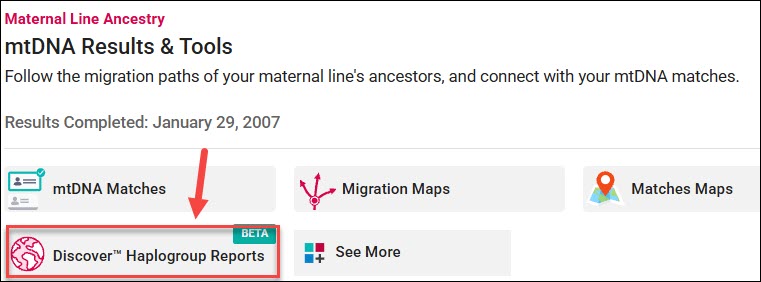

Click through on the Discover link in your account on your dashboard for either mitochondrial or Y-DNA.

You’ll arrive on the Haplogroup Story page, which provides a summary of the information available in other Discover Reports.
- First, read, don’t skim.
- Second, don’t skip the other reports because you read the summary.
- Third, check each report for various tabs, displays, and settings.
- Fourth, read all the reports.
I wrote a very detailed article about using mitochondrial DNA, Mitotree, and Discover, here.
The Match Time Tree
The Match Time Tree is one of my favorite reports.
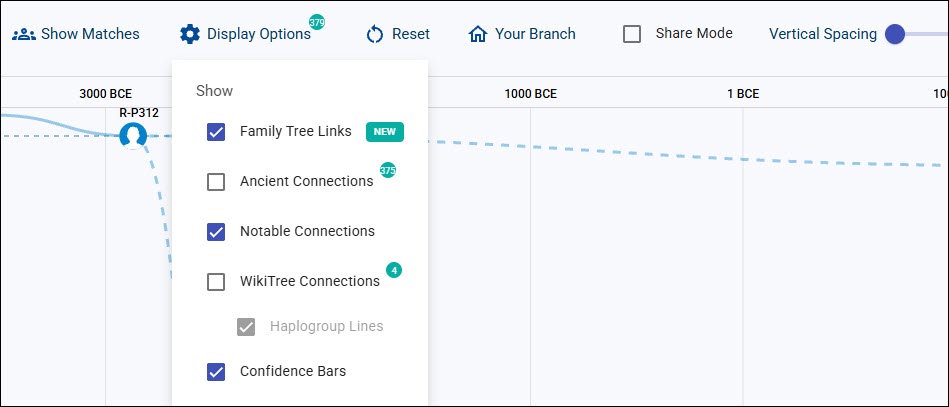
Please note the various display options at the top of reports. Checking the “Share Mode” box obfuscates the names of your matches, which allows you to share with others without unintentionally compromising privacy.

I particularly like the Match Time Tree report because it lets you view several things in one place.
- Your Big Y (or full sequence mitochondrial DNA) matches
- Genetic lineages and the time when haplogroups were born
- Globes representing the country where your match indicates that their EKA was born
- Your matches’ EKAs and family trees, if they have provided them
Additional Bonuses:
- Ancient Connections
- WikiTree Connections and lineages
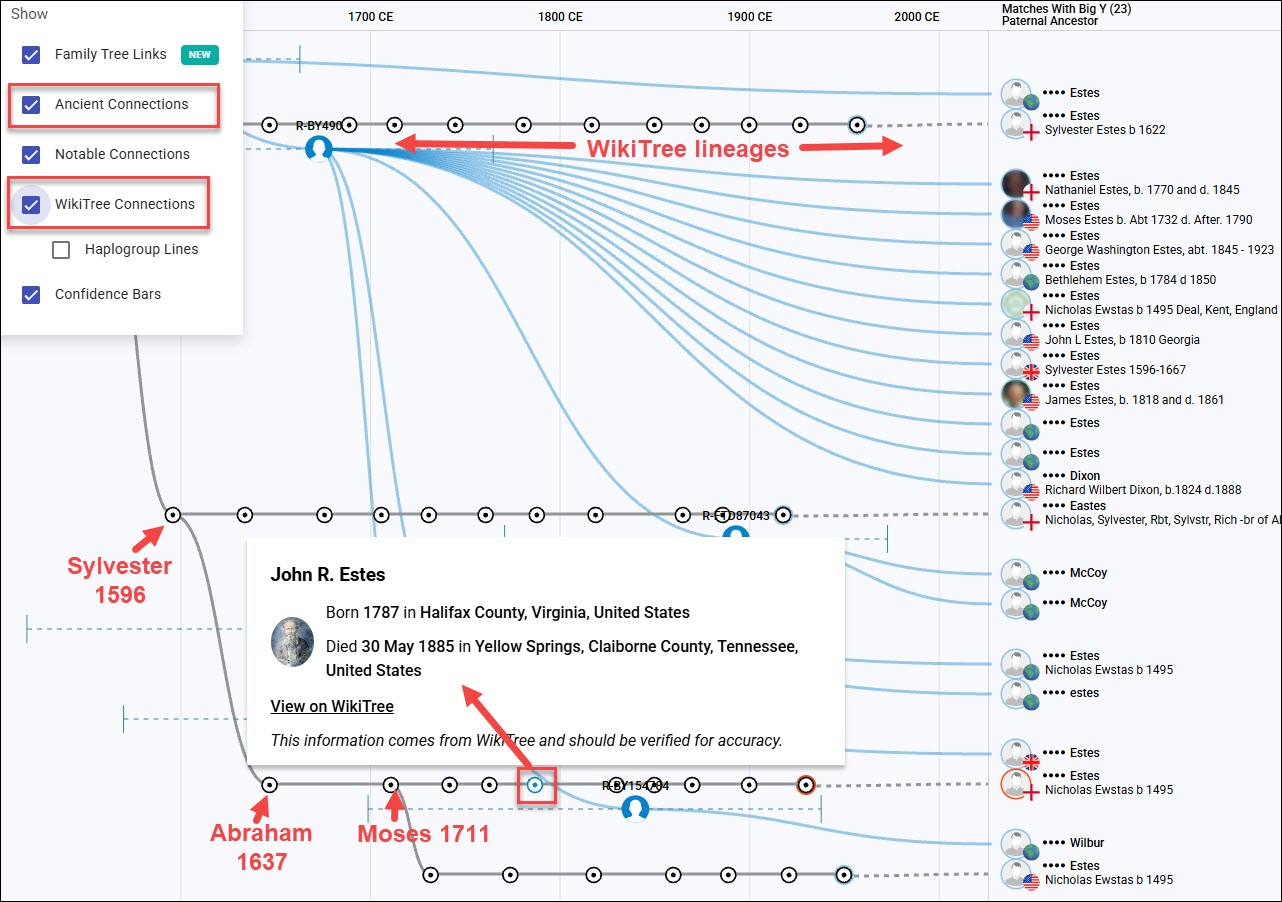
If you add both Ancient Connections and WikiTree Connections to your display criteria, you’ll see them on the Match Time Tree too. In this case, no Ancient Connections are found in this portion of the tree, but four matches have connected themselves to WikiTree as indicated by the rows of pearls.
This is particularly useful because EKAs only display the Earliest Known Ancestors, but you’re probably interested in the entire lineage of your match. Their entire WikiTree patrilineal lineage is displayed on the line, including their common ancestors and their linkage to each other.
In this case, the little blue circle “pearl” on the WikiTree line where I clicked is John R. Estes.
I can click on any pearl and see which ancestor that represents in that match’s tree. I think this is the best thing since sliced bread because, generally, I am looking for the missing ancestor between the tester and their common EKA with their matches. I certainly care about the EKA, but to break down brick walls, I need to know how I can connect from here to there.
Ancient Connections
Ancient Connections shows archaeological excavations from published academic papers and is an evergreen feature. This means that as new Ancient Connections are added, in order of how closely they are genetically related to the tester’s haplogroup, older Connections roll off the end.

You can select the option to view Ancient Connections on your Globetrekker video too.

Ancient Connections are anchored in the location where they were excavated by little trowels.
While you may think that Ancient Connections are simply interesting, they hold more information. On a different line, I found another clue about the “rumored” birth city of my ancestor, based on an Ancient Connection buried on the Roman Road just outside the city who could potentially have been his ancestor.
Some Ancient Connections are our haplo-cousins, because they belong to descendant haplogroups from our common ancestor, but sometimes their locations, cultures and artifacts can speak to the lives of our ancestors too.
I wrote in detail how to use Ancient Connections here and here. Don’t shortchange yourself by glossing over these.
Notable Connections
Notable Connections may or may not be useful genealogically. It all depends on who is included, and what the evidence reveals. Some Notable Connections are actually bonus Ancient Connections.

The Estes haplogroup R-ZS3700 connects to the Celtic Mystery Ancestor, but based on the Time Tree, the Celtic Mystery Ancestor cannot be the Ancestor of the Estes line. They do, however, share R-DF49 as their common ancestor.
Who doesn’t love a good mystery? Regardless of how we are related, I enjoyed studying the Mystery Ancestor’s cultural information and assembling it in context with the other Ancient Connections. I stood at Tara, Knowth and Newgrange long before Discover existed, but now I know it might have been where our haplo-cousin lived, and maybe where our common ancestor R-DF49 once stood too.
Notable Connections are intended to be fun facts, but sometimes there’s more.
Globetrekker

Screenshot of Globetrekker video
Globetrekker is a video that maps the path your ancestors took across the globe. Note the several display options at the top, along with the legend. Globetrekker is really an amazing tool.
Haplogroup locations and connecting lines or paths are based on:
- Locations of ancient burials which serve as anchors
- Locations of the EKAs of various testers who carry that specific haplogroup
- Least-cost travel, meaning given the choice between climbing over the Himalayas or taking the route through a valley beside a river – the valley was almost always the choice of people who survived to create the next generation.
- Only extending into the Americas for the migration routes of indigenous peoples
You may notice what appears to be confusion or inconsistency in the most recent haplogroups. For example, we know that R-ZS3700 occurred in Moses Estes, born in 1711 in Virginia, son of Abraham Estes, the immigrant, who was born in Kent, England. However, that’s not what the map depicts.
The men who carry R-ZS3700 accurately show their EKA as Nicolas Ewstas born in 1495 in England.
Globetrekker can only work with the information it has at its disposal. Moses is not the testers’ EKA, but he is the progenitor of R-ZS3700. The way we know that R-ZS3700 occurred in Virginia in 1711 is because the tested male-line descendants of Moses all carry that SNP mutation, while tested male-line descendants of Moses’s siblings, Abraham’s other sons, do not.
Another potential reason that haplogroup placement might appear faulty is because multiple testers with that haplogroup show different locations.

Let’s say the EKA location provided by one man is Dover, Kent, England, across the Strait of Dover from France. A second man shows his EKA on the far western coast of Ireland in Galway, and a third man places his EKA in the Orkney Islands, off the Northern coast of Scotland.
The “average” of those three locations might be someplace around Dumfries in Scotland, even though none of the three men entered that location – and all three testers are equally unhappy.
Keep in mind that EKA information and locations are user-entered, and, as we know, genealogy can be incorrect and people are sometimes confused.
Another factor affecting placement is that when someone enters only a country name, maps default to the center of the country, which can pull the Globetrekker migration paths in one direction or another.
Globetrekker, in combination with other tools, provides valuable evidence about your ancestor.
Globetrekker for mitochondrial DNA has not been released but is planned for the future.
Suggested Projects
Suggested Projects can also provide clues.

Projects are suggested for one of three reasons:
- Other people with that surname have joined that project
- The surname administrators have identified your surname as “of interest” to their project
- Your haplogroup, haplogroup branches, or specific keywords
If you’re searching for your ancestor, hints about their origins or family associations may be found in the projects suggested.
Mitochondrial DNA Match Time Tree Haplotype Clusters
One important difference between the Y-DNA Match Time Tree and the mitochondrial DNA Match Time Tree is that the mitochondrial DNA version displays results within haplotype clusters.
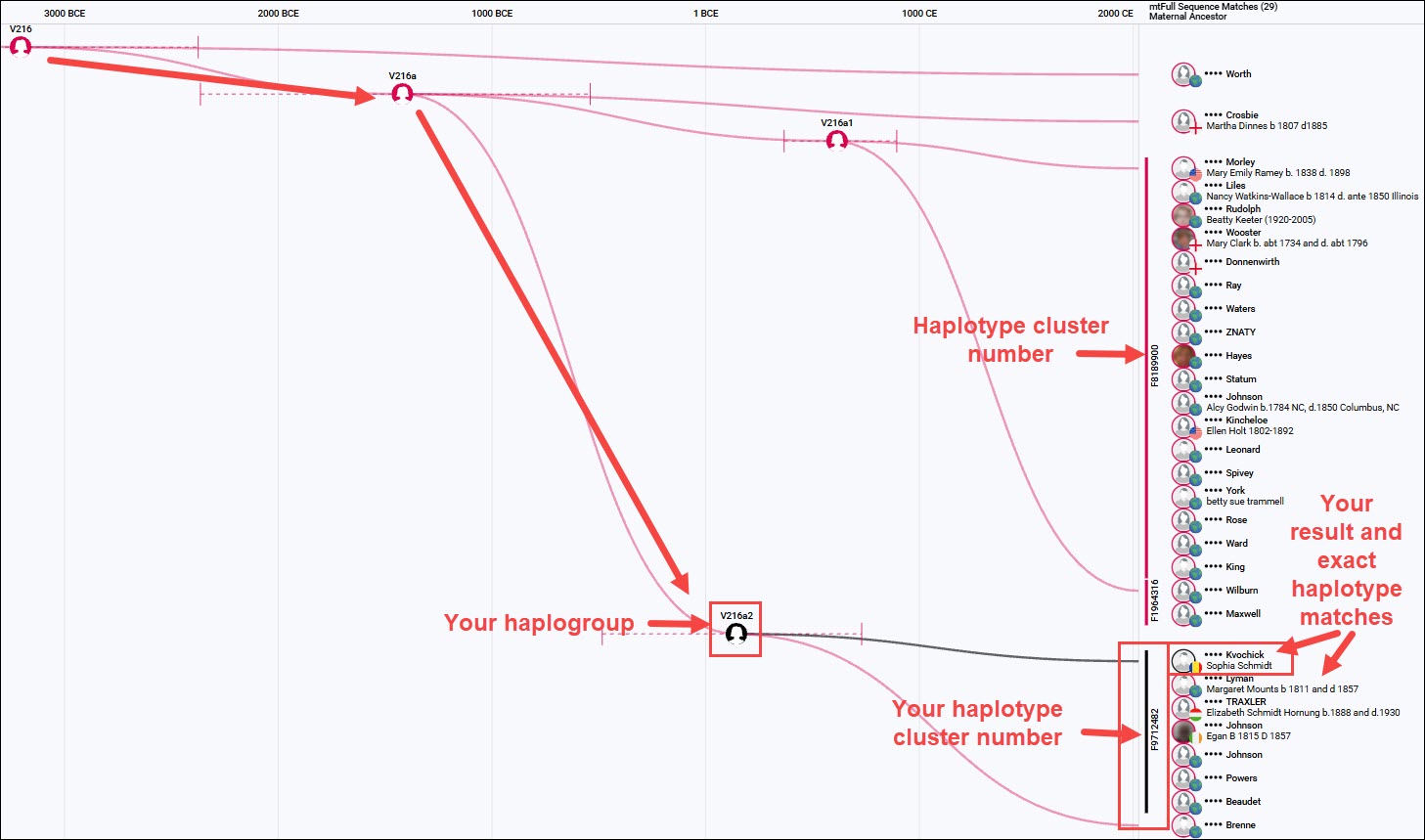
On the Match Time Tree, your results are displayed with other members of your haplotype cluster. These are your closest matches.
That isn’t to say that some of your identifiable ancestors won’t be found in other haplotype clusters, or even neighboring haplogroups, but the place where you should start your analysis is with other people in your haplotype cluster.
I’ve written about haplotype clusters here and here.
Your Summary Checklist
Mitochondrial DNA and Y-DNA have the unique ability to look in a laser-straight line back in time. Unlike autosomal DNA, mtDNA and Y-DNA aren’t recombined, so parts of your ancestor’s DNA aren’t lost during recombination with the other parent’s DNA.
The tools on your personal page, plus Discover Reports, provide at least 25 different ways to analyze your results, several of which are critically important for genealogy and, specifically, breaking through brick walls.
- Y-DNA STR matching and Big Y DNA matching are different, so take advantage of both and review every level.
- Big Y-700 results include several features that neither STR matching nor mitochondrial DNA can offer.
- Mitochondrial DNA provides features not available for Y-DNA.
- Matching includes how close or distant the match is, their haplogroup, EKA, EKA’s country of origin, and family tree.
- The Matches Map provides the exact location provided for your matches’ EKAs, not just the country.
- Enter your patrilineal and matrilineal Earliest Known Ancestor (EKA), their ancestral location, and all of your family surnames.
- Be sure you’ve uploaded a tree. Also, connected yourself to your WikiTree profile.
- Be sure to check your matches’ trees and their WikiTree connection, if they have one, and build out as necessary to connect with your EKA and your other matches’ EKAs.
- Use Group Project Results to check groupings made by the volunteer administrators, EKAs, and possibly marker values.
- The Y-DNA Block Tree displays matches along with their mutations in a vertical phylogenetic tree format.
- Mitochondrial DNA matching also provides your legacy (pre-Mitotree) haplogroup, plus your Mitotree haplogroup, haplotype cluster and features like trees. Be sure to view all match levels.
- Haplotype clusters group mitochondrial DNA testers who match exactly, and include less-reliable markers that are excluded from general matching and haplogroup formation. Research to identify a common ancestor should begin with your haplotype cluster, but should not ignore people in different haplotype clusters.
- Investigate unfamiliar surnames through family histories, testing male-line descendants of different sons, and researching descendants of the identified genetic ancestor. Look for intersections and remember: right time, right place, opportunity.
- Advanced Matching allows you to combine two (or more) forms of DNA test to determine if someone matches you on both tests, such as either a Y-DNA or mtDNA test and the Family Finder autosomal test. Remember that they may match on both tests due to different ancestors.
- Y-DNA haplogroups found in Family Finder matches may identify additional family members in your lineage who have not taken a Y-DNA test (but might be willing to).
- Discover provides more than a dozen additional reports.
- The Match Time Tree plots your matches with their EKAs along a genetic timeline.
- The Match Time Tree also displays WikiTree Connections, which include each generation, not just the EKA.
- The Match Time Tree displays Ancient Connections and Notable Connections, which may prove useful.
- Ancient Connections provide insight into the movements of your ancestor, their culture and location at a specific point in time.
- Globetrekker
 , an animated Y-DNA video, tracks your ancestor’s journey across the world to the locations where recent haplogroups are found, based on a variety of criteria and data points.
- Suggested Projects provides a list of projects that you may be interested in joining based on common interests. The suggestions alone may be especially important when surnames aren’t particularly helpful, and when you’re searching for your ancestor’s origins.
- Use Discover’s Compare feature to determine how different haplogroups relate to each other and whether they are in the same genetic lineage. This is particularly useful for autosomal matches with the same surname.
- Use shared matches, segment triangulation, and your matches’ trees to investigate possible connections identified through Family Finder surname and haplogroup searches.
- Contact matches, collaborate, and preserve the genealogy they provide.
Your ancestors are waiting for you to find them!
_____________________________________________________________
Share the Love!
You’re always welcome to forward articles or links to friends and share on social media.
Subscribe!
If you haven’t already subscribed, it’s free. You’ll receive an e-mail whenever I publish by clicking the “follow” button at the top of the main blog page, here.
Help Keep This Blog Free
I receive a small commission when you click a vendor link in my articles and purchase that item. This does NOT increase your price but helps me keep the lights on and this informational blog free for everyone. Please click on the affiliate links in the articles or to the vendors below if you are purchasing products or DNA testing.
Thank you so much.
DNA Purchases and Free Uploads
- FamilyTreeDNA – Y-DNA, mitochondrial and autosomal DNA testing
- MyHeritage DNA – Autosomal DNA test
- AncestryDNA – Autosomal DNA test
- AncestryDNA Plus Traits
- 23andMe Ancestry – Autosomal DNA only, no Health
- 23andMe Ancestry Plus Health
Genealogy Products and Services
- MyHeritage Subscription with Free Trial
- Legacy Family Tree Webinars – Genealogy and DNA classes, subscription-based, some free
- Legacy Family Tree Software – Genealogy software for your computer
- OldNews – Old Newspapers with links to save to MyHeritage trees
- MyHeritage Omni comprehensive “everything included” subscription plan
- Newspapers.com – Search newspapers for your ancestors
- NewspaperArchive – Search different newspapers for your ancestors
My Books
- DNA for Native American Genealogy – by Roberta Estes, for those ordering the e-book from anyplace, or paperback within the United States
- DNA for Native American Genealogy – for those ordering the paperback outside the US
- The Complete Guide to FamilyTreeDNA – Y-DNA, Mitochondrial, Autosomal and X-DNA – for those ordering the e-book from anyplace, or paperback within the United States
- The Complete Guide to FamilyTreeDNA – Y-DNA, Mitochondrial, Autosomal and X-DNA for those ordering the paperback from outside the US
Genealogy Books
- Genealogical.com – Lots of wonderful genealogy research books
- American Ancestors – Wonderful selection of genealogy books
Genealogy Research
- Legacy Tree Genealogists – Professional genealogy research